10 Tips from the Claude Code Team
Battle-tested workflows from Boris Cherny—Claude Code's creator—and his team. Parallel worktrees, evolved CLAUDE.md files, subagents, and the practices that ship 259 PRs in 30 days.
TL;DR
Boris Cherny created Claude Code. In 30 days, he landed 259 PRs—497 commits, 40k lines added, 38k removed. Every line written by Claude Code + Opus 4.5. This thread documents the workflows that make that possible: parallel worktrees, evolving CLAUDE.md files, reusable skills, and subagents that keep context clean.
Quick Reference
# PARALLELISM
git worktree add ../feat feature-branch   # New worktree
cd ../feat && claude                       # Isolated session

# PLANNING
/plan                          # Enter plan mode
"Review this as a staff eng"   # Second opinion

# SUBAGENTS
"Spawn a subagent to write tests for this"
"Use a subagent to explore the auth module"

# PROMPTING PATTERNS
"Test this change before committing"
"Reimplement this more elegantly"
"Fix" + [paste entire Slack thread]

# CLAUDE.md ESSENTIALS
# - Add every mistake as a rule
# - Commit to git, share with team
# - Review weekly, prune outdated rules
Why This Source Matters
Boris Cherny isn’t a power user sharing tips. He built Claude Code as a side project in September 2024. When he describes workflows, he’s describing how the tool was designed to be used. When his team shares practices, they’re sharing what works at the source.
The 259 PRs stat isn’t marketing—it’s a public claim from someone whose reputation is tied to the tool’s success. The practices below are what enable that velocity.
The 10 Tips
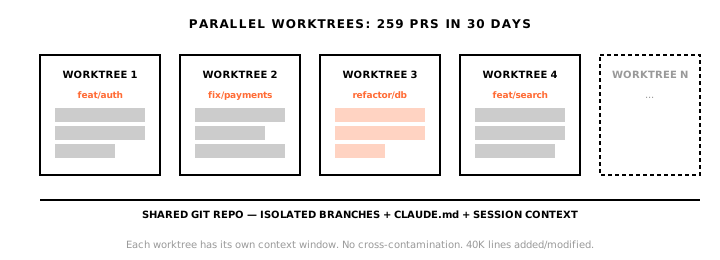
1. Parallel Worktrees
“Spin up 3–5 git worktrees at once, each running its own Claude session in parallel.”
Setup:
# Create worktrees
git worktree add ../project-feature feature-branch
git worktree add ../project-refactor refactor-branch

# Each worktree gets its own Claude session
cd ../project-feature && claude
The insight: Claude Code is designed for parallelism. One session per worktree. Context stays clean. Ship multiple things simultaneously.
2. Plan First
“Begin complex tasks in planning mode before implementation.”
The insight: Planning mode isn’t a suggestion—it’s how the team actually works. Separate planning from execution.
3. CLAUDE.md Evolution
“Maintain a documentation file that evolves with corrections.”
Example CLAUDE.md rules:
# Project Rules
- Never use `any` type in TypeScript
- Always run `pnpm test` before committing
- Use kebab-case for file names
- API responses must include `requestId` for tracing
The insight: The team shares a single CLAUDE.md for the Claude Code repo. Multiple updates per week. When Claude makes a mistake, it goes in the file. Error rates drop over time because the file accumulates institutional knowledge.
4. Reusable Skills
“Create custom commands committed to version control.”
| Examples | Use Case |
|---|---|
| Tech-debt commands | Automated refactoring tasks |
| Slack/GDrive integrations | External system access |
| Analytics agents | Data queries without context switching |
The insight: Skills aren’t just shortcuts—they’re institutional automation. Commit them. Share them. Let the whole team benefit from one person’s prompt engineering.
5. Automated Debugging
“Paste bug threads directly to Claude with ‘fix’ instructions.”
| Practice | Why It Works |
|---|---|
| Slack integration enabled | Bug reports flow directly |
| Copy-paste entire threads | Full context, no summarization loss |
| Single instruction: “fix” | Claude has everything it needs |
The insight: Context switching is the enemy. Bring the bug report to Claude, not the other way around.
6. Advanced Prompting
“Challenge Claude to test changes, request elegant re-implementations.”
| Technique | Result |
|---|---|
| ”Test this change” | Verification before commit |
| ”Reimplement elegantly” | Forces simplification |
| Detailed specifications | Reduces ambiguity, better output |
The insight: Vague prompts get vague results. The team writes detailed specs—not because Claude can’t figure it out, but because specificity gets better output faster.
7. Terminal Setup
“Ghostty terminal with colored tabs, tmux for task organization, voice dictation.”
| Tool | Purpose |
|---|---|
| Ghostty | Fast, colored tabs for visual context |
| tmux | Task organization, persistent sessions |
| Voice dictation | Faster than typing for long prompts |
The insight: The environment matters. Visual separation between sessions prevents confusion. Voice input is faster for natural language.
8. Subagents
“Deploy subagents for focused task handling, keeping main context clean.”
When to spawn subagents:
- Writing tests for code you just implemented
- Generating documentation
- Exploring unfamiliar parts of codebase
- Any task that would pollute main context
The insight: Don’t pollute your main session with tangential work. Spawn a subagent. Let it handle the focused task. Return to clean context.
9. Data Analytics
“Leverage CLI tools like BigQuery directly within Claude Code.”
| Practice | Why It Works |
|---|---|
| BigQuery via CLI | Real-time metrics |
| No SQL writing | Claude handles the query |
| In-session analysis | No context switching to dashboards |
The insight: If it has a CLI, Claude can use it. Bring data queries into your coding session instead of switching to separate tools.
10. Learning Mode
“Enable explanatory output, generate visual HTML presentations, create ASCII diagrams.”
| Practice | Why It Works |
|---|---|
| Explanatory output | Understand unfamiliar code |
| HTML presentations | Visual learning from code |
| ASCII diagrams | Architecture understanding |
The insight: Claude isn’t just for writing code. Use it to understand code. Ask for explanations. Ask for visualizations. The investment in understanding pays off.
The 259 PR Context
These tips enable extreme throughput:
Every line written by Claude Code + Opus 4.5. The practices above are what make this sustainable.
What’s Transferable vs. What’s Unique
Transferable to Any Team
| Practice | Difficulty |
|---|---|
| Parallel worktrees | Low—just start using them |
| Plan mode first | Low—behavioral change |
| CLAUDE.md evolution | Low—start adding corrections |
| Reusable skills | Medium—requires initial investment |
| Subagents | Medium—requires understanding |
Requires Infrastructure
| Practice | Requirement |
|---|---|
| Slack integration | MCP setup, Slack access |
| BigQuery in session | CLI tools, permissions |
| Voice dictation | macOS/accessibility setup |
Requires Expertise
| Practice | Why |
|---|---|
| ”Reimplement elegantly” | You need to recognize elegance |
| Staff engineer review simulation | You need to know what a staff engineer catches |
| Detailed specifications | You need domain expertise to specify correctly |
The Tacit Angle
Several of these practices relate directly to session memory:
| Tip | Memory Challenge | How Tacit Helps |
|---|---|---|
| CLAUDE.md evolution | Knowledge lives in file, not sessions | Session history shows why rules were added |
| Parallel worktrees | Context scattered across sessions | Unified search across all sessions |
| Plan mode | Plans exist in session, then vanish | Plans persist, become searchable |
| Subagents | Subagent context is lost | Subagent sessions captured too |
The 259 PR workflow generates massive session history. Without persistence, the why behind those PRs disappears. The code ships; the reasoning evaporates.
Recommendations
Start Here (Any Team)
- Use parallel worktrees — One session per worktree, 3-5 active
- Start CLAUDE.md — Begin with errors you’ve seen, evolve it
- Plan before implementing — Especially for multi-file changes
- Create one reusable skill — Start with your most common task
Level Up (Intermediate)
- Subagents for focused tasks — Keep main context clean
- Voice dictation for prompts — Faster for long instructions
- tmux for session management — Persistent, organized
Advanced (Infrastructure Required)
- Slack/external integrations — Bring bug reports to Claude
- CLI tools in session — BigQuery, analytics, whatever you use
- Staff engineer simulation — One Claude plans, another reviews
Confidence Assessment
| Claim | Confidence |
|---|---|
| These practices work for the Claude Code team | High — first-party source |
| 259 PRs in 30 days is real | High — public claim, reputation stake |
| Practices transfer to other teams | Medium — depends on expertise level |
| Parallel worktrees are universally beneficial | High — low cost, clear benefit |
| CLAUDE.md evolution reduces errors | High — mechanism is obvious |
Sources & Provenance
Verifiable sources. Dates matter. Credibility assessed.
10 Tips from the Claude Code Team ↗
Boris Cherny · X (Twitter)
"Battle-tested workflows from Claude Code's creator: parallel worktrees, evolving CLAUDE.md files, plan-first approach, reusable skills, subagents, and terminal setup optimizations."
Claude Code Origin and Adoption ↗
Boris Cherny · X (Twitter)
"In 30 days: 259 PRs, 497 commits, 40k lines added, 38k removed. Every line written by Claude Code + Opus 4.5. Created as side project September 2024."