TL;DR Sessions auto-save locally. Search with ⌘K. Extract meaning with ⌘I. Never lose context again.
The Problem
You had a conversation with Claude 3 weeks ago. It solved your exact problem. Now you need it again.
Where is it?
THE REALITY
Day 1: SESSION created ─ ─ ─ ─ ─ ─ ─ ─ ─ ─ ─ ─ ─ ─ ─ ─ ─ ─ ─ ─ ─ ─ ┐
Day 15: You need it again │
Day 30: GONE (auto-deleted) │
Day 31: You rebuild from scratch │
│
Context? LOST ▼
click to expand × THE REALITY
Day 1: SESSION created ─ ─ ─ ─ ─ ─ ─ ─ ─ ─ ─ ─ ─ ─ ─ ─ ─ ─ ─ ─ ─ ─ ┐
Day 15: You need it again │
Day 30: GONE (auto-deleted) │
Day 31: You rebuild from scratch │
│
Context? LOST ▼
46 projects. 281 sessions. 30-day auto-delete.
Good luck finding anything.
The Solution
Tacit auto-saves every session locally. Before Claude deletes it.
Step 1: Save (Automatic)
Every Claude Code session saves to your local machine. Automatically. Before Claude’s 30-day deletion.
AUTO-SAVE FLOW
┌ ─ ─ ─ ─ ─ ─ ─ ─ ─ ─ ─ ─ ─ ─ ┐ ┌ ─ ─ ─ ─ ─ ─ ─ ─ ─ ─ ─ ─ ─ ─ ┐
│ Claude Code │ ─ ─ ─ ─ ─ ─ ▶ │ TACIT │
│ session │ │ watches │
└ ─ ─ ─ ─ ─ ─ ─ ─ ─ ─ ─ ─ ─ ─ ┘ └ ─ ─ ─ ─ ─ ─ ┬ ─ ─ ─ ─ ─ ─ ─ ┘
│
▼
┌ ─ ─ ─ ─ ─ ─ ─ ─ ─ ─ ─ ─ ─ ─ ┐
│ LOCAL │
│ SAVED │
└ ─ ─ ─ ─ ─ ─ ─ ─ ─ ─ ─ ─ ─ ─ ┘
click to expand × AUTO-SAVE FLOW
┌ ─ ─ ─ ─ ─ ─ ─ ─ ─ ─ ─ ─ ─ ─ ┐ ┌ ─ ─ ─ ─ ─ ─ ─ ─ ─ ─ ─ ─ ─ ─ ┐
│ Claude Code │ ─ ─ ─ ─ ─ ─ ▶ │ TACIT │
│ session │ │ watches │
└ ─ ─ ─ ─ ─ ─ ─ ─ ─ ─ ─ ─ ─ ─ ┘ └ ─ ─ ─ ─ ─ ─ ┬ ─ ─ ─ ─ ─ ─ ─ ┘
│
▼
┌ ─ ─ ─ ─ ─ ─ ─ ─ ─ ─ ─ ─ ─ ─ ┐
│ LOCAL │
│ SAVED │
└ ─ ─ ─ ─ ─ ─ ─ ─ ─ ─ ─ ─ ─ ─ ┘
Your sessions are organized by project:
~/tacit/
├── project-x/     (42 sessions)
├── project-y/     (18 sessions)
└── project-z/     (7 sessions)
Step 2: Search (⌘K)
Press ⌘K. Type what you remember.
SEARCH FLOW
⌘K "auth PKCE "
─ ─ ─ ─ ─ ─ ─ ─ ─ ─ ─ ─ ─ ─ ─ ─ ─ ─ ─ ─ ─ ─ ─ ─ ─ ─ ─ ─ ─
[01-15] project-x/42 FOUND
[01-12] project-x/38 FOUND
[01-08] project-y/12 FOUND
3 RESULTS in 0.02s
click to expand × SEARCH FLOW
⌘K "auth PKCE "
─ ─ ─ ─ ─ ─ ─ ─ ─ ─ ─ ─ ─ ─ ─ ─ ─ ─ ─ ─ ─ ─ ─ ─ ─ ─ ─ ─ ─
[01-15] project-x/42 FOUND
[01-12] project-x/38 FOUND
[01-08] project-y/12 FOUND
3 RESULTS in 0.02s
Full-text search across every message, in every session, in every project.
Found in 0.02 seconds.
500 messages. No time to read. Press ⌘I.
INTENT-LIGENCE
⌘I session-42
─ ─ ─ ─ ─ ─ ─ ─ ─ ─ ─ ─ ─ ─ ─ ─ ─ ─ ─ ─ ─ ─ ─ ─ ─ ─ ─ ─ ─ ─ ─ ─ ─ ─ ─ ─ ─
INTENT │ OAuth flow for mobile app
DECISIONS │ PKCE, httpOnly cookies, refresh tokens
CONTEXT │ React Native, Expo, no secure storage
OUTCOMES │ auth.ts, useAuth hook, token refresh
500 messages → 4 columns. Under a minute.
click to expand × INTENT-LIGENCE
⌘I session-42
─ ─ ─ ─ ─ ─ ─ ─ ─ ─ ─ ─ ─ ─ ─ ─ ─ ─ ─ ─ ─ ─ ─ ─ ─ ─ ─ ─ ─ ─ ─ ─ ─ ─ ─ ─ ─
INTENT │ OAuth flow for mobile app
DECISIONS │ PKCE, httpOnly cookies, refresh tokens
CONTEXT │ React Native, Expo, no secure storage
OUTCOMES │ auth.ts, useAuth hook, token refresh
500 messages → 4 columns. Under a minute.
Intent-ligence extracts what matters:
Intent — Why you started this sessionDecisions — What you chose and whyContext — What mattered at the timeOutcomes — What you produced
The Workflow
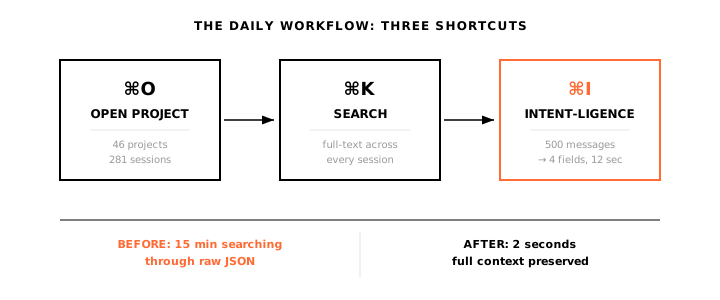
DAILY WORKFLOW
┌ ─ ─ ─ ─ ─ ─ ─ ─ ─ ─ ┐ ┌ ─ ─ ─ ─ ─ ─ ─ ─ ─ ─ ┐ ┌ ─ ─ ─ ─ ─ ─ ─ ─ ─ ─ ─ ┐
│ ⌘O │ │ ⌘K │ │ ⌘I │
│ Open │ ─ ─ ─ ▶ │ Search │ ─ ─ ─ ▶ │ Intent- │
│ Project │ │ Find │ │ ligence │
└ ─ ─ ─ ─ ─ ─ ─ ─ ─ ─ ┘ └ ─ ─ ─ ─ ─ ─ ─ ─ ─ ─ ┘ └ ─ ─ ─ ─ ─ ─ ─ ─ ─ ─ ─ ┘
│ │ │
▼ ▼ ▼
Browse Instant Extract
sessions results meaning
click to expand × DAILY WORKFLOW
┌ ─ ─ ─ ─ ─ ─ ─ ─ ─ ─ ┐ ┌ ─ ─ ─ ─ ─ ─ ─ ─ ─ ─ ┐ ┌ ─ ─ ─ ─ ─ ─ ─ ─ ─ ─ ─ ┐
│ ⌘O │ │ ⌘K │ │ ⌘I │
│ Open │ ─ ─ ─ ▶ │ Search │ ─ ─ ─ ▶ │ Intent- │
│ Project │ │ Find │ │ ligence │
└ ─ ─ ─ ─ ─ ─ ─ ─ ─ ─ ┘ └ ─ ─ ─ ─ ─ ─ ─ ─ ─ ─ ┘ └ ─ ─ ─ ─ ─ ─ ─ ─ ─ ─ ─ ┘
│ │ │
▼ ▼ ▼
Browse Instant Extract
sessions results meaning
Three shortcuts. That’s it.
Shortcut Action Use When ⌘O Open project Switch between projects ⌘K Search Find any session ⌘I Intent-ligence Understand long sessions
Before and After
BEFORE TACIT
"Where's that auth conversation?"

Finder → ~/.claude/sessions/
  → Scroll... scroll... scroll...
  → Open JSON... unreadable
  → Wrong session
  → GONE (deleted)

Time: 15 minutes
Result: LOST context, rebuild from scratch
click to expand × BEFORE TACIT
"Where's that auth conversation?"

Finder → ~/.claude/sessions/
  → Scroll... scroll... scroll...
  → Open JSON... unreadable
  → Wrong session
  → GONE (deleted)

Time: 15 minutes
Result: LOST context, rebuild from scratch
AFTER TACIT
"Where's that auth conversation?"

⌘K "auth PKCE"
  → 3 results
  → Click
  → FOUND

Time: 2 seconds
Result: Full context preserved
click to expand × AFTER TACIT
"Where's that auth conversation?"

⌘K "auth PKCE"
  → 3 results
  → Click
  → FOUND

Time: 2 seconds
Result: Full context preserved
What’s Next
Tacit is currently in beta. If you’re a Claude Code power user who can’t afford to lose context, join the waitlist to get early access.